No Birds in the Office
- Itch.io
Made with: Unity
The project
It was a normal day of work for John. Everything was going as usual.
But then... A goose appeared.
The company policy was clear : No birds in the office!
Context
This was a 1 month project loosely inspired by the game Vampire Survivors, made in a team of 2.
We wanted to have fun with this project, make something hysterical, and a ton of birds invading an office building seemed funny to us.
Team:
Gaëlle Becel - 2D/3D Art, VFX
Antoine Foucault - Programming, Ragdoll, Level Design, Sound Design, Trailer
My role
Since our main goal with this project was to have a funny game, everything we did needed to go in that direction.
Since we were only two on the team, we each had to wear different hats. My main tasks were programming and level design.
Level Designer : I created tight levels, with a lot of props with physics to make armies of birds coming to chase the player really chaotic and funny.
Programmer : Ragdolls were a must to us, so it was my absolute priority to work on that.
Ragdolls
To properly use ragdolls in our game, I needed to work on two aspects:
- Limiting the ragdoll to the visual of the player, ensuring it had no effect on their movement or collisions
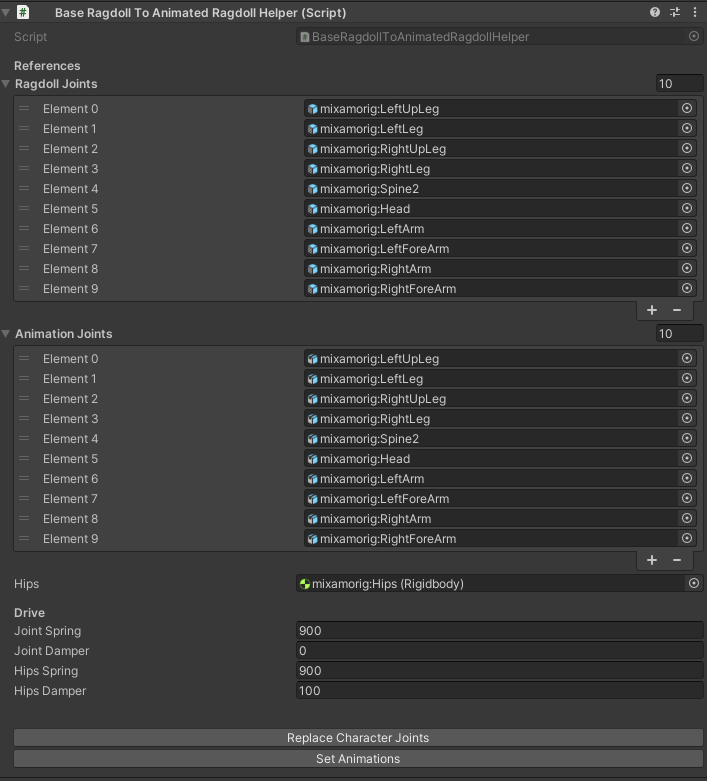
- Making a tool to easily make animated ragdolls.
This one was pretty simple, I just needed to make sure to lock the ragdoll spine to the player's center, and properly set up the Physics Matrix.
First, I made an an animated ragdoll with a placeholder model.
To do that, I have two models, one with the animations (which can be hidden), and the other which takes the rotations of the joints of the animated model, while keeping the ragdoll physics.
(On the left, the animated ragdoll, and on the right the original animated model)
This worked great for what we wanted, but the process of making it was too long, and needed to be automated, especially since we had multiple characters to ragdoll.
The goal was to build a tool that could easily go from the Unity default ragdoll with character joints to an animted one, like I had made with the placeholder asset.
I spent some time on this tool, to ensure it was easy of use (only a few references to make and a button to click) and reusable for other projects.
And this time was well spent, as it made us gain a lot of time in the end.